


AirMagic vs Luminar: What to Choose for Drone Photo Editing
AirMagic photo editor from Skylum has long been popular among drone photography enthusiasts. As technology continues to evolve, it's crucial to stay ahead of the curve. That's why we're excited to introduce you to AirMagic's successor, Luminar and show you why it’s the top choice for 2024
Pläne ansehenWhy Luminar is a Must-Have for
Drohnen-Fotografie ist
Verbessertes Benutzererlebnis
Luminar’s interface is designed for efficiency, offering users a clean and intuitive workspace. By focusing on simplicity, users can quickly access powerful tools without unnecessary complexity. Additionally, Luminar features robust Library Management for easy organization and access to your photo collection.
.webp)
Bearbeitungs-Tools der nächsten Generation
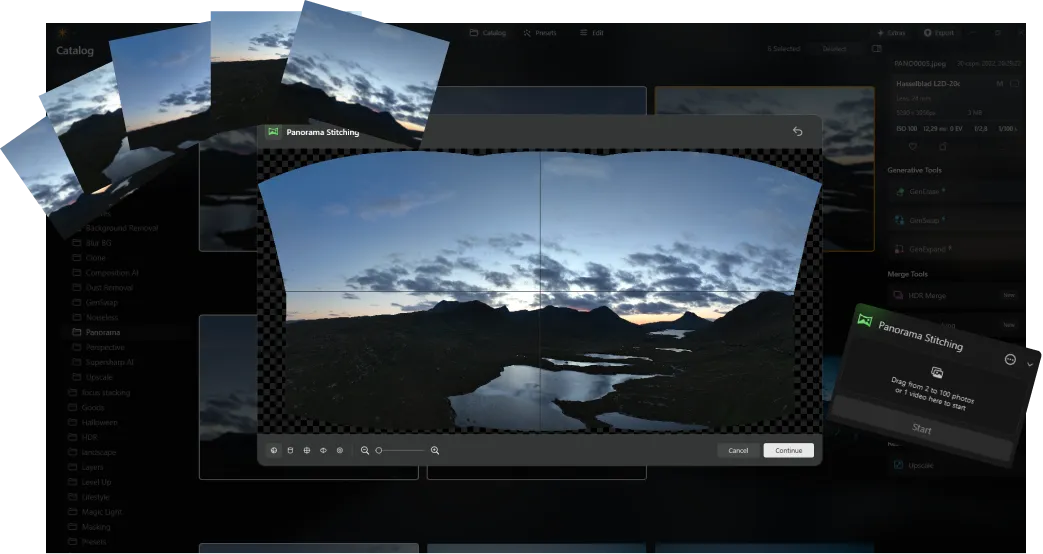
Luminar offers advanced features like AI-driven Panoramaerstellung, das mühelos mehrere Drohnenaufnahmen zu atemberaubenden Panoramen zusammenfügt. Darüber hinaus enthält Luminar Neo eine Reihe von neuen generativen Tools, mit denen du deine Fotos verbessern und dein kreatives Potenzial voll ausschöpfen kannst.
Immer auf dem neuesten Stand
As a newer and more advanced product than Skylum AirMagic, Luminar is continuously updated to stay compatible with the latest photography tools. This ongoing support ensures that users with new equipment can seamlessly integrate Luminar into their editing workflow, providing a smooth and efficient experience.


AirMagic vs Luminar: A Brief Overview of Key Differences
| Aspekt | AirMagic | Luminar |
|---|---|---|
Verwaltung der Bibliothek |  |  |
Stapelverarbeitung | | |
AI-basierte Funktionen | | |
Unterstützung von PNG-Transparenz | | |
Unterstützung für neue Kameras | | |
Stile und LUTs | | |
Anpassungen synchronisieren | | |
System-Sounds | | |
Native Unterstützung für ARM und Apple M | | |
Aurora HDR
Luminar
Einzelbild-Tone-Mapping
Einzelbild-HDR Zusammenführen
Stapelverarbeitung
Automatische Erkennung der Stapelverarbeitung
Verbesserte HDR-Belichtungsreihen-Erkennung in der Stapelverarbeitung
Unterstützung neuer Kameras
Benennung von Stapeldateien und Qualitätseinstellungen für den Export
Speichern von Exportvorgaben
Bis zu ~1,5x-1,8x schneller auf verschiedenen Betriebssystemen
Umfangreiche Funktionalität

Ein Programm & Plugin für macOS & Windows


.webp)

Behalte deinen Workflow, erweitere deine Möglichkeiten
Want to get all the benefits of Luminar but have an established Lightroom workflow? Great news! You can use all the power of Luminar within a plugin for Lightroom without changing up your usual post-production process.

Anwendung & Plugin
Für Mac & Windows
- Leistungsstarker AI-Editor
technische Unterstützung 24 Stunden / 7 Tage die Woche
30 Tage Geld-zurück-Garantie
Join our communities

